 |
   |
|---|---|
|
New PDF Plugin to be released soon for Sense Document Export. The PDF Plugin closely follows Sense Document Layout, Style and Pagination. |

Outliner / Word Processor for Authoring with Reference Management
Whether authoring an essay, thesis or journal article, Sense may help you focus on your Writing Workflow and Reference Management as a:
- One / Two Pane Outliner to hierarchically organise document content within collapsible / expandable tree views.
- Word Processor for the straightforward formatting of text, Annotation entry, Hyperlinking and In-Text Citation.
Many of Sense's capabilities are built upon the possibly unique (object-oriented) file structure of Sense Documents breaking dependency on less flexible file formats dating back to at least the 1980's with key features and support including:
- Viewpoints: Reference Management for In-Text Citation, Bibliography Generation and much, much more.
- Subdocuments: Create and Merge Subdocuments for focussed editing and improving workflow flexibility.
- Pagination: Paginated document views providing both full detail and outline editing.
- Multilingual Editing: Mixed language editing within a single line.
- Green Printing and Export: Reduce paper wastage by targeting printing to only that needed.
- Plugins: Enhance Sense by installing freely available plugins.
Sense is installed with a traditional Help system to provide comprehensive guidance on Sense features and capabilities.
Beyond the Help system, a Startup Tutorial document is included within the Sense installation as well as a recently published Sense Document titled Carbon Taxation Mechanism: this document evolved by result of broader, more intensive, testing of Sense features within the remit of representing a real-world authoring task.
A freely available RTF Plugin enables document import / export transfer between the many editors, including Microsoft Word, that support the Rich Text File format.
Sense as an Outliner.

Sense supports both one and two pane Outliner editing enhanced by a combination of toolbar View Mode and left hand pane tab selection to determine and optimise presentation of document content.
With closely synchronised fully navigable left and right pane views, the right pane shows the full "Big Picture" document content while the left hand pane shows content within a hierarchically organised tree view based on collapsible-expandable section headings. Content may be readily promoted, demoted and moved between and within levels of the document tree.
Furthermore, tab selection of the left hand pane from Content to Outline will switch the view from showing a full (line by line) document tree to a section only structural breakdown aiding uncluttered working while promoting and demoting content.
With the left pane hidden, single pane outliner working of the document structure is aided by toolbar and keyboard shortcuts while maintaining full screen word processing capability.
Two-way synchronisation between left and right panes is further enhanced on selection of the View Mode Folding option. Icons shown in the right pane margin allow expansion and collapse of documentation when both one and two pane outliner working.
Sense as a Word Processor.
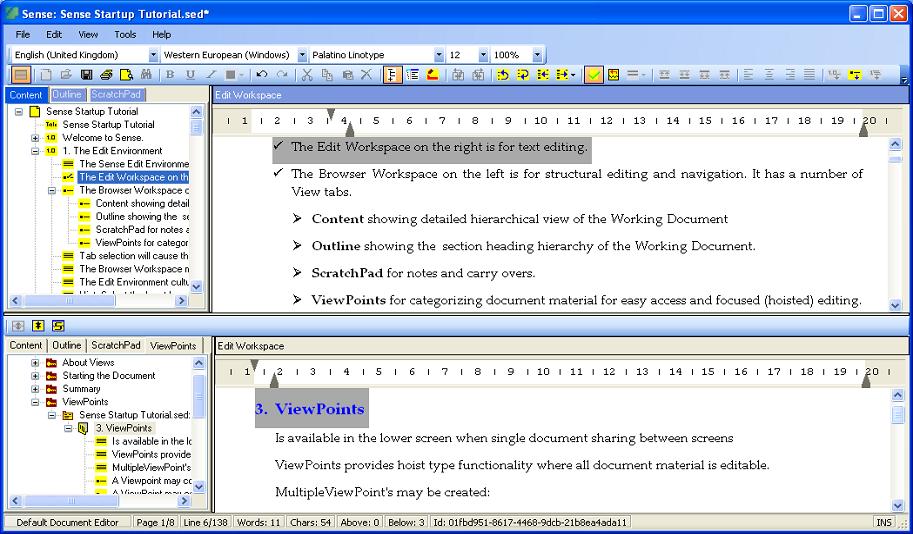
Word Processing is carried within the context of two (Upper and Lower) Edit Environments each comprising left and right Panes.
Detailed editing is carried out within the right pane of the Edit Environment while the left pane shows a structural overview of document content typically used for document navigation and Outliner Editing.
Multi-document editing is supported without the need for separate Sense instances with:
- Different locations of a single document or two individual documents concurrently editable across the (Upper and Lower) Edit Environments.
- Document snippets from both the current document and external Sense documents editable within ViewPoints located within the lower Edit Environment.
Section headings, numbered and bulleted paragraph lists may be attributed different style settings such as font, font size and indent according to level within Sense's truly hierarchical document structure.
Character formatting in Rich Text including bold, italics, underlining and colour.
Annotations and Marked Text as Note variants may be inserted into documentation to unobtrusively tag, associate pop-up comments and optionally categorise text of significance. Note navigation within the main document is by toolbar command with filtering optionally based on categorisation. Furthermore, notes may be included into ViewPoints as reference material and also subject to broader QDA Review and Analysis using a separately installable plugin.
Single click hyperlinking from text and images is supported by Sense for both web-based material and inter-document connectivity which, in this latter case, avoids the need for conventional and explicitely established (albeit supported) bookmarks.
Highly useful within the context of following a written argument while avoiding disruptive activated hyperlink navigation, a link review alternative enables Sense target documentation to be concurrently displayed within a separate and screen moveable Pop-up control.
In-text Citations are implemented as a special form of Open Book Cursor hyperlink to open and / or review supporting Reference Managed material with Bibliographic and Endnote listings generated automatically.
Word and Character Counts are dynamically maintained for monitoring progress against designated task limits.
Viewpoints.

A key feature of Sense is ViewPoints used to group both whole documents and cloned, even overlapping, part documents into a theme or topic based tree hierarchy for isolated review, editing and Reference Management.
Opened within the lower edit workspace, research documentation and notes may be gathered into Sense's ViewPoints in support of In-Text Citation, Bibliographic listing and focussed editing.
Attribution requirements are dependent on both the nature of the Primary Source (eg web, book) and the selected Citation Style.
In-text Citation and Reference List formatting is defined in user editable Citation Style specific definition files.
Citation Styles are User Extendable with an initial selection based on APA, MLA, Turabian and ISO 690.
Both Numeric and Parenthetical types of In-Text Citation are supported.
Reference List styling includes an option to exclude In-Text Citation content from document Word and Character counts.
Bibliography and Endnote Reference List generation is automated from attributed material in the Reference Manager.
An OpenXML Bibliography (Reference List) File is automatically generated for use by third party word processors.
Pagination.
Paginated document views have been introduced into Sense's collapsible tree hierarchy views of both full detail and outline for:
- Direct editing of documentation within a Paged Environment.
- Fast Page by Page navigation even within large documents via a left pane Page tab.
- Easy insertion and removal of page breaks to optimise page content.
The new Pagination support coupled with already established
- Subdocument Support and
- Reference Management within ViewPoints for In-text Citation and Bibliographic listing
further enhances Sense's Writing Workflow Support.
In order to maintain compatibility with the new Pagination features, all Sense Plugins are upgraded with new installation versions available.
Subdocuments.
Subdocument support is integrated into Sense to significantly increase writing efficiency particularly for those larger authoring tasks with creation from and merging into a Master document reduced to simple actions.
Section headings and underlying text may be readily transferred into Subdocuments inheriting Style and other configurations from the master document for uninterrupted writing.
When including an external Sense document as a subdocument, the master document's style seemlessly overrides the subdocument style.
Subdocument nodes are shown within both the full Content and Outline tree view panes of the master allowing underlying documentation to be hidden or shown according to expansion state.
Subdocument material may be edited within the context of the master document views or alternatively "opened" for more direct editing overlaying the master document's edit environment temporarily.
Multilingual Editing.

Sense supports Multilingual documentation with a simple Input Language toolbar selection allowing mixed language editing within a single line - full instructions on how to achieve this are provided within Sense's integrated Help system.
Individual documents may be viewed and edited simultaneously in different languages between the two (Upper and Lower) Edit Environments.
Subdocument material and material within ViewPoints is edited within the cultural context of its parent document with language change automatic.
Multilingual documentation is supported by a File Encoding Selection that includes ISO-8859, Windows Codepage and Unicode character sets.
Green Printing and Export.
Sense may be used to make a valuable contribution towards reducing paper wastage by restricting printing, and indeed export, to virtually exact needs.
Toolbar selection of the Folding View Mode option allows sections to be collapsed to shrink detail required for printing and export.
If that isn't sufficient, Sense's Multi-Line Select feature accessed via the left pane menu may be used to select, even spatially dispersed, documentation for print and export.
Multi-Line Select is not supported within ViewPoints but left pane node collapse may be used to advantage to combine material from even multiple documents for print and export.
Plugins.
A range of Freely Installable Plugins are available to extend Sense's capability. Possibly, the most important is the RTF plugin allowing file format conversion between the Silva Elm Document (sed) format and Rich Text Format (rtf) for broader use of documentation on platforms other than Microsoft Windows.
Sense's integrated FTP Client enables direct RSS Feed and OPML Document publication to your website.
The OPML Viewer pane provides dual purpose functionality as a web browser and OPML Document / RSS Feed Reader: for example, click on the OPML Icon above and see raw OPML XML: repeat this from within the OPML Editor's Viewer pane to reveal a formatted OPML document.